Allowance card: type a growth value, read the month it buys
A small tool that turns an ACBuy growth value into a level, a shipping discount and the free attempts issued each month.
Check a growth value
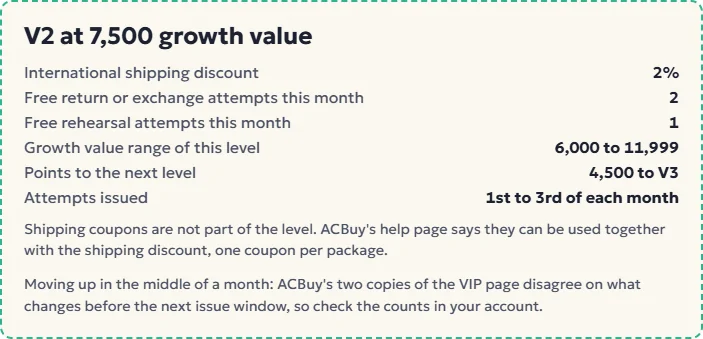
Your growth value is shown in the ACBuy account under the VIP page. Type it in, or tap a level if you only know that. The card reads the level table ACBuy prints on its help page, as of November 9, 2026, and nothing else.
Whole numbers only. Anything from 96,000 up is V6, the top of the table, so the card shows no next level there.
The card works offline once the page has loaded and keeps nothing: refresh and it is empty again.
Type a growth value or pick a level
- International shipping discount
- -
- Free return or exchange attempts this month
- -
- Free rehearsal attempts this month
- -
- Growth value range of this level
- -
- Points to the next level
- -
- Attempts issued
- 1st to 3rd of each month
Shipping coupons are not part of the level. ACBuy's help page says they can be used together with the shipping discount, one coupon per package.
Moving up in the middle of a month: ACBuy's two copies of the VIP page disagree on what changes before the next issue window, so check the counts in your account.
Three tools here, three different questions
This site has three tools, and they answer different questions.
- The allowance card (above) answers
what does my level give me this month
. It converts a growth value into a level and lists the attempts and discount from the table. - The search field in the home page hero answers
is there one of these in the catalogue
. Short English words work best, for examplefleece jacket
. - The catalogue shelves answer
what is out there
when you have no item in mind yet. Each card opens one shelf.
A typical session runs in that order backwards: browse a shelf, search for a variant, buy through ACBuy, and once parcels start going out, come back to the card to see where your growth value has taken you.
Where the card's figures are copied from
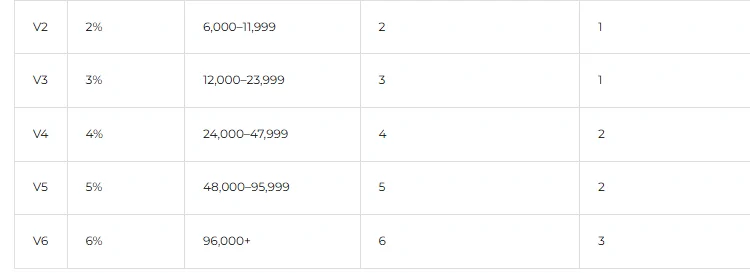
- Level, discount, attempts and range: the table on ACBuy's help page Acbuy VIP Level Explanation, read November 9, 2026.
- Points to the next level: the lower bound of the next level minus your number. The account page shows the same figure with the wording
Only {value} personal growth points needed to reach VIP {level}
. - Attempts issued: the help page's issuing rule, 1st to 3rd of each month.
- The coupon line: the coupon combination rule on the same help page, and the one-coupon-per-package note on ACBuy's coupon page.
If ACBuy changes the table, the card will be wrong until we update it. The date above the card is the date we last compared it with the help page.
Deliberate gaps in the card
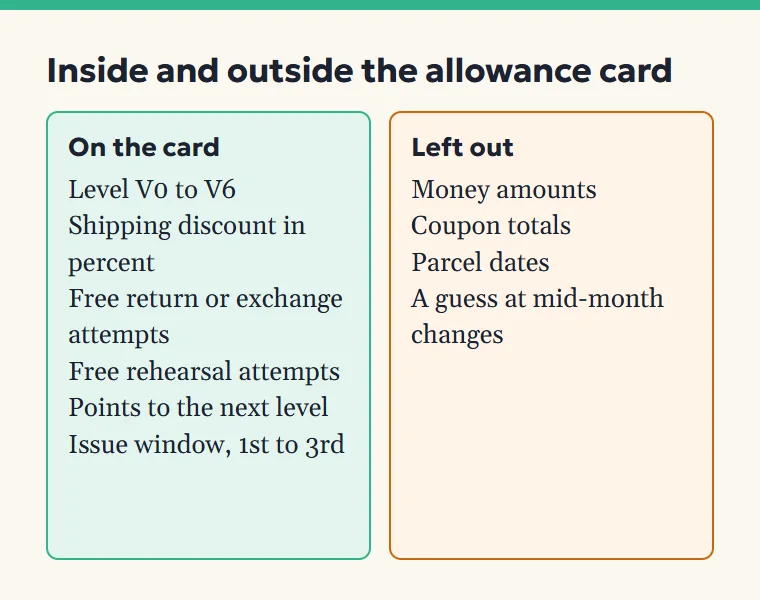
Money. The card shows the discount as a percentage only. ACBuy applies it to an international shipping quote that depends on weight, size, destination and line, so any amount we printed would be invented.
Coupon math. We do not add a coupon to the discount. The order in which they apply is not published, and each coupon has its own minimum freight amount.
Dates and history. The card does not ask when you joined or when a parcel arrived. Growth value updates after a parcel is received, so a parcel still on its way is not in the number you see yet.
Mid-month changes. ACBuy's two copies of the VIP page describe a mid-month upgrade differently, so the card flags it instead of choosing one.
Three numbers run through the card
Three worked examples, using only the level table on ACBuy's help page:
| Growth value typed | Level | Discount | Free return or exchange | Free rehearsal | Points to next level |
|---|---|---|---|---|---|
| 150 | V0 | 0% | 1 | 0 | 50 to V1 |
| 7,500 | V2 | 2% | 2 | 1 | 4,500 to V3 |
| 50,000 | V5 | 5% | 5 | 2 | 46,000 to V6 |
The middle row is the common case for someone who has sent a handful of parcels. Under the 1 CNY per point wording on the account page, 7,500 points would mean roughly 7,500 CNY of parcel shipping fees already delivered.
Next on this site: VIP levels in full Shipping coupons